I do not believe in using automation softwares or services for content creation, but I like to find shortcuts for everything else! Well here’s a great shortcut from the article directory extraordinaire EzineArticles. Learn how to autotweet your latest ezine articles to your Twitter followers. Great news – it’s free!
When you sign up for a free EzineArticles account, you get the great benefit of being able to add your social media profiles for added exposure to your articles. This is especially true or Twitter. In case you didn’t know, not only will EzineArticles promote your latest published articles in their twitter stream (which at the time of this writing had almost 60,000 followers), but you can also have them autotweet (automatically tweet) the link to your expert author page to their Twitter followers as well. Here’s how to set up in less than 10 seconds!
1. Go to EzineArticles admin
2. Go to last link: Social Media
3. Add or update your Twitter url
4. Authorize EA to tweet your expert author page link every 90, 60, 30, or 14 days. (You could also choose to leave this feature off, but why?)
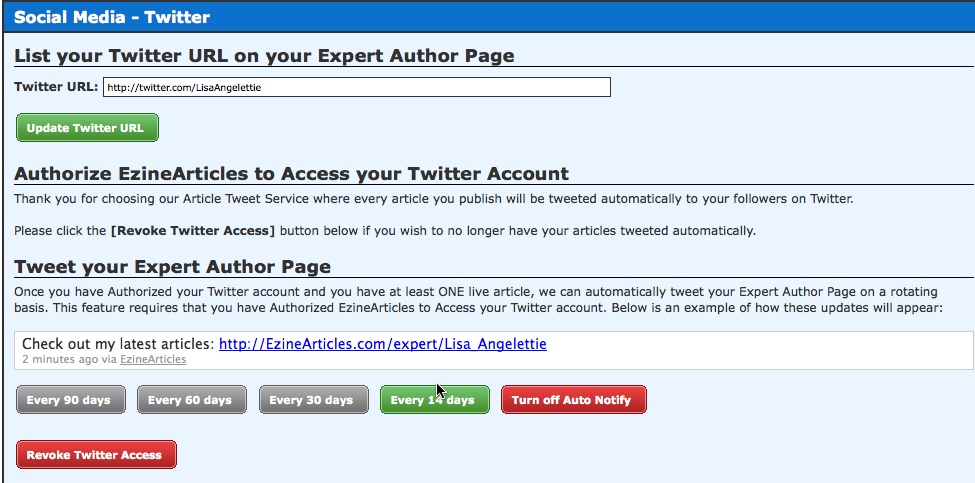
That’s it. Set it and forget it. I have set up my author page to autotweet every 14 days and if you can’t wait that long, you can always find my latest EzineArticles at http://ezinearticles.com/?expert=Lisa_Angelettie or visit me at Twitter: http://Twitter.com/LisaAngelettie 🙂 Happy autotweeting!


Lisa Angelettie
Latest posts by Lisa Angelettie (see all)
- Back Matter 101: How To Add Killer Call To Actions To Your Books - August 3, 2015
- Shelfari Is No Longer An Option In Author Central - July 28, 2015
- What Are The Most Well-Read Cities In America? - June 2, 2015
Lisa,
I'm like you when it comes to creating content, and I try to avoid the lure of automated everything. But I'm always looking for ways to streamline my processes. This is a great way to get your writing in front of people who would appreciate it. Thanks for sharing
Keisha
Thank you for this information. I just set mine up also. I'm new to Twitter and trying to figure it all out but this sounds like a great idea for my published articles in Ezine.
Hi Keisha.
Thanks for stopping by. Love ur site name.
Lisa