Leverage What You Know!

Enter Your Name & Email To >>

1. Get My FREE Training On How To Use Content To Get More Clients & Cash

2. Get My Weekly Marketing Articles Sent To Your Inbox

3. Get My Exclusive "Email Only" Content Marketing Strategies

Get Your FREE Training Here!

We respect your privacy!

Today I want to show you how you can convert your Facebook profile page to a fan page AND the pros and cons of doing so, based on a little experiment I did with my husband’s Facebook pages.

When Facebook opened up to the public and caught on with business owners we all began with a Facebook profile page. We all have one. Unfortunately for most of us, we were forced to mix personal use of Facebook along with business use and it made for a kind of “muddy” social media business model. No one really liked it like that. I didn’t want personal stuff from my friends pushed on my wall, and I’m sure some of my family members were like “What the heck is Lisa writing about today? We just want to hear about the kids!”

So in comes Fan Pages. Cool. We can use these for business. So now we have a profile page which if you used for business a lot, you still have a lot of those types of people sending you friend requests AND we have a fan page which up until a while ago we had a pretty good system for encouraging the “like”. With Facebook’s new timeline format for both profile and fan pages, that has changed a bit. But you either have just a profile page OR you have a profile and a fan page.

For example, if you do a search for “Lisa Angelettie Facebook”, you will see results for both my Fan Page and my profile page.

Lisa Angelettie On Facebook

One day I accidentally ran into an article on Facebook on how to convert a profile page to a fan page and instantly became interested in what the benefits of that would be. Hey, I didn’t even know you could do that. So of course I didn’t want to experiment on myself! (LOL!) So I used my husband as a guinea pig and these are the steps that we took…

1 – Download all of your Facebook data on your profile page.

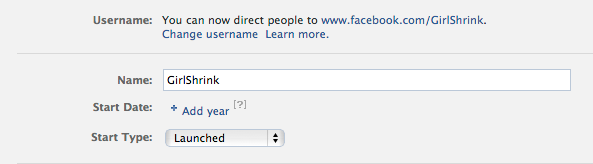
Go into the general settings of your page and you will find the link to download your personal data which will include your photos, timeline info, (see below). because once you convert to a fan page you will lose all of that data. The only data that is moved to your fan page are your friends which are now your FANS and your username. Uh, my husband was stubborn and refused to do this first step which he later regretted. So do this step!

What Personal Information is Downloaded During the Back-Up Process?

  1. Personal profile information (groups, information, interests, contacts etc.)
  2. Photos & videos
  3. Wall posts
  4. Status updates
  5. Content that your friends have uploaded
  6. Friend lists
  7. Notes
  8. Messages sent and received
  9. Events that you have RSVPd for
  10. Comments you have received and made on walls, photos etc.

Learn How To Easily Monetize Your Pinterest Page With Your Products, Books or Services In Under 60 Seconds…

pinterest for businessPinterest has been steadily climbing in popularity on the web and is now the 3rd largest social media site on the web (right behind Twitter and Facebook). That’s pretty impressive for a new kid on the block.

Now there’s another cool thing you can do on Pinterest, and that’s add your books, products, etc. with a cute little price banner across your image. Here’s how you do it in 60 seconds…

1. Identify The Items That You Want To Promote On Pinterest.

Remember that you should select items that you have good images for because that’s what Pinterest is all about –the visual appeal. You should also probably pick items that are your entry level priced products. For this example, I’m going to show you how I added a mini guide that I sell about How To Write Content That Google Loves on Amazon.

2. Add The Image Of Your Product

Add or Pin your image to Pinterest. When you add your images to Pinterest with this strategy, you are adding them to the “Gifts” category. This category is auto-filled with products by users who specify a certain price for their products in the description area.

sell on pinterest

3. Include The $ or £ Symbol In Your Description

In order to make sure that your product ends up in Pinterest’s Gifts section and that the price banner shows up across your image (like the one on mine above), you just need to make sure that you include a $ or £ symbol in your description. For example, I put $2.99 in the description area for my guide.

Make sure to add your payment links in the description and/or link area, so that buyers know how to purchase your product. Select the board category for your product and save.

And in 60 seconds you have a product up on Pinterest in front of all that daily traffic!

New to Pinterest? Read my tutorial on how entrepreneurs can get started with Pinterest

This article was written based on an article topic idea submitted by one of my weekly ezine readers. I try my best to include any and all input from my readers into my editorial calendar. So if there’s a topic you’d like to learn more about, please feel free to drop me a note over on Facebook (the fastest way I’ll see it).

How To Add More Optin Email Subscribers To Your List Using This One Super Simple Strategy…

grow your optin email subscribers

It’s amazing how we entrepreneurs can fret over a million things when it comes to building our businesses. Did we pick the right name? Will people like what we write? What will we say during our next speaking engagement? How do we find a good virtual assistant. The list is endless. But the major issue that comes up over and over when I talk to entrepreneurs is the one we all know and love — “How can I get more people on my list?”.

I hear you loud and clear! And guess what, I have a super ninja strategy to help you do just that that will change your optin email subscriber statistics overnight. But right now I want to quickly tell you about a few facts that you need to understand when it comes to building your list…

1. You must drive traffic to your site in order to capture names for your list. The more traffic you attract, the higher your optin email subscriber rate will be. This is a numbers game. That’s why companies with lots of traffic have bigger subscriber lists.

2. In order to create this stream of traffic, let’s get real. You have to create content that is interesting, informative, engaging or entertaining that the reader wants. Content that’s worth them “following the trail” back to your site. Do you have ninja tips to share with your readers? Share some!

3. Once you start getting all this traffic, there must be a working optin form somewhere to capture the names of the readers. I like using Aweber to make this all happen, but whatever company you use it’s more important that you have an optin in place and that you’ve tested it to make sure it’s working.

Yet This Is Where A Lot Of Entrepreneurs Drop The Ball!

I bet many of you have an optin box in your site’s sidebar right? Maybe you even have one at the end of your posts. Perhaps you’ve created a cute little landing, squeeze, or entry page like the one I have over at LisaAngelettie.com, but statistically I bet that your landing page is not even your highest trafficked page. Have you checked your stats lately? Do you even know?

Wouldn’t it make more sense to have your optin email subscriber form on your #1 traffic page?

And if statistically that’s your home page, then what about your #2 page? Or #3? I bet it’s not that landing page you’ve been relying on. It’s another single page on your website, and for many people it’s their ABOUT page.

But I Don’t Want To Jump To Any Conclusions, So We’re Going To Check Your Stats And Make Sure…

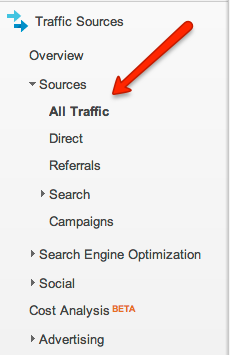
1. I use Google Analytics and WordPress Stats to track all of my sites, but regardless of what tool you use to measure your site’s statistics, let’s open them up.

If you have never purposely tracked your statistics, don’t worry, your webhost probably does it for you. So for example, if I go the cpanel section of my account with Hostgator and scroll down, I can see an icon called awstats, which I can click on to see the latest stats for my site.

2. Take a look at the top 5 pages on your site and the clicks they are getting.

3. More than likely your home page is getting the most clicks. That is pretty typical.

4. Take another look to see what pages deeper in your site are “hot”.

5. Is it a single post that gets a lot of attention? Or is it your About or Start Here page?

It’s Ninja Time!

Now that you know what the top 3-5 pages are getting the most traffic on your site, it’s time to strategically place an optin form on those pages. This is what is know as getting “in front” of traffic instead of having to chase it down.

Notice how my About page has several optin email subscriber forms. That’s because based on my stats, I know that it is one of my more frequented pages. There are a few others that I identified as high traffic pages as well, and so I’m going to place an optin email subscriber form on those as well because it is a prime opportunity for me to connect with more people who are interested in what I do and be able to build a relationship with them by adding them to my list.

My Ninja Tip Super Simplified

Okay, so here is everything I just said summarized really simply:

1. Don’t just rely on the optin box on your home page. You can do better!

2. Identify your highest traffic pages using any basic statistic tool available to you.

3. Add optin email subscriber forms to those pages. Don’t be afraid to initiate the relationship:)

I guarantee you, that you will begin to see a rise in your optin email subscriber rate!

Do you have any other ninja tips on adding more subscribers to your list? Please share them with us in the comment section below or on Facebook.

Content Marketing Question Of The Week: Time Management

time creating web content

Question
I am relatively new to content marketing and wanted to know how much time I should dedicate to this strategy considering I have so many other things to do in my business.

Answer
I often say this when I work with clients but it is very important that you understand that content marketing at this point on the web is not only crucial but it’s mandatory. Without a foundation of content in your business, you are bound to fail. The web is fueled by content. Fresh content. So it’s important that you treat content marketing with the respect it deserves!

Carving out time to create content that your ideal prospects will want to read and share should be one of your top priorities. So carve out time for that priority as you would any other major aspect of your business. A lot!

Remember that the time spent in on content creation has a fantastic ROI.

For one hour’s worth of work and one killer article or video, you could possibly get over (and let’s be very conservative!) 200 new readers. A portion of them will convert and become subscribers to your list. Let’s say 75. Out of those 75, twelve of them really liked your next newsletter where you offered them a complimentary strategy session. They liked it so much that 7 of them booked the sessions.

Out of those 7 sessions, 3 people signed up for one of your offers. Perhaps it was two VIP Days and one 90 day client. Maybe all three joined your entry level membership program or ordered your book.

What does that income look like?

How much was one hour of your time worth to you?

Imagine if you wrote 3, 10, 100 more articles or videos? Consistently? And the same numbers applied.

What does your business look like now?

See wasn’t the time put in worth it?

Final notes – dedicate as much time to content marketing as you would any major marketing strategy in your business. I always encourage my clients to write for themselves in order to really capture the true essence and uniqueness of what makes you, well you. BUT you can always outsource things like article submissions, video editing, etc. for better time management.

Do what feels right for you and measure the results.

How much time are you spending writing content right now? Do you think it’s enough? Do you think  you spend too much time developing content? Share your thoughts with us!


Keyword Research: SEMRush Review & Tutorial

How To Use SEMRush To Conduct Keyword Research At the foundation of every piece of carefully written content on the web is research. To be more precise, keyword research. If you are a member of my training program Articology or if you’ve followed me for a while via my newsletter, you know that I talk [...]

Read the full article →

How To Automatically Retweet Your Favorite Twitter Follower’s Tweets In 60 Seconds (or less!)

“Attract New Strategic Alliances & Thank Your Existing Parnters When You Retweet Their Content To Your Community. Best thing is — it’s all on autopilot. Doesn’t look spammy. And you can accomplish it all in 60 seconds or less:)” It’s really more important than ever to get social media “right”. One of the ways that [...]

Read the full article →

How To Make A Facebook Timeline Fan Page: 5 Essential Steps

Facebook is the #1 social marketing tool for small business owners to create a broad reach but stay really up close and personal with readers. It’s important that if you are a small business owner, service professional, etc. that you have a presence on Facebook with a Facebook Fan Page. But guess what? Facebook is [...]

Read the full article →

How To Create A WordPress Comment Thank You Page & Redirection

I talk a LOT about how to attract new clients but today I’d like to pay attention to how we are going to “convert” those prospects into paying clients. Well there are a lots of strategies for this, my primary one being building a “trust relationship” with readers. Yet that takes some time to nurture [...]

Read the full article →